Anúncios
If you’ve ever felt aches and stiffness after a gaming session, you’re not alone. Extended play can make you forget about your body’s alignment. Keeping your gaming posture healthy becomes essential for avoiding discomfort and injuries that sneak up over time.
Every minute at your console or PC adds up. That means paying careful attention to the way you sit. Poor posture isn’t just about slouching — it can impact your circulation, energy, and even your in-game performance as hours tick by.
This article will walk you through concrete, approachable steps for reinforcing your gaming posture. Discover simple adjustments, actionable routines, and habits used by experienced players who want to play longer and feel better doing it.
Setting Up Your Space for Effortless Alignment
Optimizing your environment lets you maintain healthy gaming posture without constant reminders. Positioning equipment, light, and your seat helps cues your body to stay aligned naturally, reducing strain.
Think of your setup as your posture’s foundation. Just as chefs prep their stations before cooking, setting up your gaming area the right way makes keeping good posture automatic after you sit down.
Maximizing Chair Adjustment for Comfort
Adjust your chair so your feet are flat on the floor and thighs parallel to the ground. Support your lower back—the lumbar region—using your chair’s cushion or a rolled towel for added comfort.
Sit back in the chair so your pelvis touches the rear and avoid perching on the edge. A slight tilt backward, around 100 degrees, supports your natural spinal curvature during gaming posture sessions.
Armrests aligned with your desk prevent tense shoulders. If they’re too high or low, your upper arms will tire quickly. Move your elbow close to your sides for long-term endurance during intense play.
Screen Placement for Neutral Neck Alignment
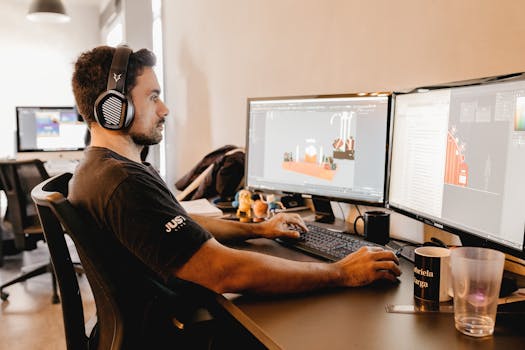
Set your monitor so the top third is just below eye level. That means your eyes look straight ahead, not down or up, relieving neck tension during sessions and supporting optimal gaming posture.
Keep screens about an arm’s length away to reduce eye strain and avoid hunching forward. Aim for the main display directly in front of you. Swiveling your neck repeatedly builds up hidden stress.
If using multiple monitors, angle them slightly inwards and close enough that you don’t twist your neck or squint. Test this adjustment by centering your head and noting if you can see all screens easily.
| Setup Element | Quick Adjustment | Body Impact | Takeaway Action |
|---|---|---|---|
| Chair height | Feet flat | Improves circulation | Adjust chair before sitting |
| Lumbar support | Use lumbar cushion | Reduces lower back strain | Add a pillow if needed |
| Monitor height | Top at eye level | Aligns neck straight | Stack books if too low |
| Monitor distance | One arm’s length | Prevents leaning forward | Check position every hour |
| Lighting | No glare | Protects eyes, keeps head upright | Adjust window or lamp |
Building Movement Breaks Into Every Session
Scheduling pauses combat the slow creep of stiffness and keep you alert. Short, targeted breaks every hour result in lasting posture improvements and stave off fatigue during long play.
Prepare yourself with a toolkit of simple moves and reminders. Treat these breaks as game checkpoints: small, frequent stops that preserve your alignment so you can re-enter gameplay safely and refocused.
Creating Micro-Routines for Resetting Posture
Pick a trigger—like loading screens or finished matches—to cue quick, one-minute posture resets. Stand, stretch, and refocus on sitting tall before you return.
- Step away whenever you hear the end-of-round sound; stretch arms overhead and roll shoulders back.
- Try neck rotations after every pause menu; this loosens muscles and prevents lingering head-forward posture.
- During long cutscenes, flex your ankles and roll wrists; keep blood flowing and posture relaxed.
- Set a timer on your phone for hourly reminders to check your alignment, stand, and move for sixty seconds.
- In group games, nominate a “posture captain” who cues everyone to stand and stretch—make it social for accountability.
These gestures become habits fast if you tie them to familiar gaming sound cues or on-screen events, helping your body reset unconsciously.
Mixing Dynamic Stretches With Every Pause
Choose accessible stretches you can do right at your station. Remember to breathe deeply and move smoothly to support circulation and reinforce proper gaming posture with each repetition.
- Stand and stretch tall: reach for the ceiling, then slowly twist side to side to decompress your spine.
- Step back from your chair and perform a gentle hamstring stretch, hinging at the hips—not rounding your back.
- Interlace fingers and extend your arms forward to open your shoulders—hold for ten seconds, feeling your chest rise.
- Seated: tuck your chin, then gently tilt your head side-to-side, keeping shoulders down for neck relief.
- Roll both shoulders upward, then slide them down your back until relaxed; this counters the effect of hunching forward.
Building these stretches into your play makes regular posture maintenance effortless. Consistency will help your alignment stay strong all session.
Fine-Tuning Body Awareness for Prolonged Play
Developing an eye for subtle shifts in your gaming posture lets you make quick, self-correcting tweaks. Even minor alignments can relieve tension before it turns into persistent pain.
Training yourself to scan for cues—like drooping shoulders or tense wrists—keeps your setup supporting your performance, not pulling you out of the zone.
Recognizing Early Signs of Fatigue
Notice slumping or head jutting forward? These are classic flags that your body needs a reset. Shrugging off such cues allows stiffness to set in and can create new gaming posture issues.
If you spot yourself crossing legs or fidgeting, treat it as a prompt for a movement break. These actions signal your body working overtime to compensate for poor alignment.
When wrists hover in mid-air or shoulders hunch, cue yourself to lower your arms and pull elbows in. Quick, mindful correction every half hour can help you stay centered.
Active Scanning for Subtle Misalignments
Periodically check your eye-line in relation to the screen. If you notice consistent downward gazing, raise your monitor until your chin lines up parallel to the ground for better gaming posture.
Monitor your breathing—shallow breaths can reflect a collapsed chest or rounded back. Deepen each breath and re-stack your ribs above your hips to release tension.
Use tactile cues like running a hand across your lower back as a reminder to maintain lumbar contact with your seat, ensuring alignment without constant vigilance.
Integrating Supportive Gear for Healthy Gaming Posture
Small upgrades to your gear can offer immediate posture support. These investments are like placing bumpers on a bowling lane: they guide you straight, making poor alignment less likely.
Choose equipment with purposeful ergonomic features. Prioritize adjustability and fit—not just aesthetics—to keep your spine, neck, and arms in harmony throughout extended sessions.
Choosing Ergonomic Tools for Natural Alignment
Look for chairs with molded lumbar pads and adjustable seat depth. They help maintain the curve in your lower back, which is a vital pillar of long-term gaming posture.
Pick keyboards that let your wrists remain flat or angled slightly down. A compact mouse matched to your hand size minimizes unnecessary wrist ulnar deviation and tension as you play.
Desk edges should be rounded, not sharp, allowing your forearms to rest comfortably. Consider wrist rests at your keyboard and mouse if you spot red marks or tingling, both signs of misalignment.
Footrests and Extra Layers for Personalization
If your feet dangle or slip, place a sturdy footrest or a stack of books under them. This stops you from inching forward, which undermines your core support and overall gaming posture.
A cushioned seat pad can relieve pressure from long periods of sitting, while a lumbar pillow adapts even basic chairs to meet ergonomic standards without a total overhaul.
Personalize lighting with desk lamps that illuminate the whole workspace. This prevents chin tucking and reinforces a naturally upright head, an underrated part of gaming posture management.
Embedding Flexibility and Strength Drills Into Your Routine
Consistently mixing low-impact strength and flexibility work into your day helps fortify the muscle groups that support gaming posture. These drills keep your core engaged and joints loose during sessions.
Think of these exercises as daily maintenance—like brushing your teeth. Small daily investment pays off in the form of increased stability, decreased pain, and greater focus while sitting for long periods.
Focusing on Core and Hip Engagement
Practice dead bugs and bridges on a yoga mat to activate deep abdominal and hip stabilizer muscles. Hold each for 15 seconds, focusing on even breathing to avoid overworking your neck or spine.
Perform seated marches: sit upright, alternate lifting your feet off the ground while keeping your back supported. This subtle move solidifies posture without intense exertion or sweating between matches.
Try the chair pelvic tilt: sit tall, gently rock your pelvis forward and back several times to find a neutral spine, then lock that position for the next block of gameplay.
Improving Shoulder and Back Range
Include standing Y-raises with your thumbs pointing up; keep your arms in your peripheral vision and squeeze your shoulder blades at the top. This move undoes hunching.
Add band pull-aparts or towel rows to reinforce upper-mid back muscles. Perform them slowly, focusing on feeling each scapula moving evenly, not just going through the motions.
Practice wall angels: stand against a flat surface, flatten lower back, and raise arms overhead, keeping contact with the wall throughout. This conscious movement helps reset gaming posture after long matches.
Adjusting Habits for Lasting Improvements
Sustained posture improvement depends on habit change as much as mechanics. Developing consistent cues and rituals makes straight sitting a lifestyle—rather than a one-off effort.
Create winning routines around your gameplay, like tying posture checks to in-game countdowns or victory screens. Frequent self-reminders train muscle memory that persists beyond each session, protecting your gaming posture over time.
Making Small Swaps for Big Benefits
Replace snacks placed far away with a designated side table. This stops you twisting or leaning to grab items, which can pull your whole upper body out of proper gaming posture mid-session.
Choose a reusable water bottle instead of reaching for cups across the room. Staying hydrated at arm’s reach saves both your alignment and your focus, minimizing break distractions.
Keep all peripherals and controls within easy reach to avoid continuous stretching. These tweaks reinforce healthy posture habits effortlessly, supporting both comfort and quick reaction times.
Reinforcing Positive Feedback Loops
Let your posture checkpoints become mini-celebrations. Mark progress with small rewards—a new playlist, meme break, or snack for each session you maintain excellent alignment.
Share your improvements with friends and ask for accountability. Group gaming can turn posture corrections into a communal effort, bolstering motivation for everyone involved.
Notice diminished aches and better stamina as signs that your new posture habits work. Let these wins reinforce your convictions, creating a cycle of improvement that keeps you invested for the long haul.
| Habit Swap | Why Change? | Outcome | Action Step |
|---|---|---|---|
| Keep snacks nearby | Prevents leaning/twisting | More consistent alignment | Place on side table |
| Use water bottle | Reduces reaching motions | Reduces break frequency | Refill before session |
| Peripherals in reach | Avoids over-stretching | Less shoulder tension | Arrange controllers/mouse |
| Set break reminders | Keeps sessions structured | Promotes resets | Use phone or smart device |
| Invite friends to join | Adds accountability | Shared gains, more fun | Share goals in chat |
Strengthening Your Posture, One Game at a Time
Staying mindful of your gaming posture keeps you comfortable and focused, from setup tweaks and movement breaks to strength drills and positive habits that last beyond single sessions.
Every step you take—whether it’s readjusting equipment or practicing a one-minute stretch—protects your body for long-term play, fueling your ability to compete and enjoy your games without pain.
Keep refining and sharing what you’ve learned about gaming posture. You’ll sustain better health, unlock smoother performance, and help fellow gamers enjoy every hour to its fullest.